
Sleepy Moon Bear
FREEApple Watch Face
Get this face
Scan with your iPhone camera
It opens Sleepy Moon Bear in the free Watch Faces app.
Or open the App Store pageHow it gets to your watch
- Open it in the free Watch Faces app
- Tap Add This Watch Face
- It lands in the Watch app on your iPhone, ready for your wrist
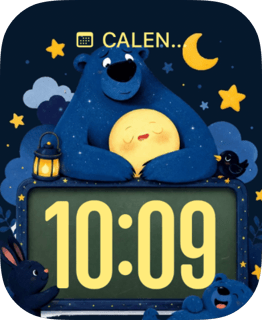
🌙 Sleepy Moon Bear watch face brings a sleepy moon-and-bear scene made for a calm evening look to Apple Watch. It is lightly cozy moonlit bedtime art inspired, with stars, clouds, lanterns, navy blues, and oversized yellow numerals while the main time stays simple to scan.
- TypeWallpaper
- AccessFree
- CategoryJust for Fun
More like this
See all 13 in Cute


Get Sleepy Moon Bear on your wrist
Free app, 4.6★ from 24K ratings. Scan with your iPhone camera, tap Add This Watch Face, and it lands in the Watch app on your iPhone.