watchOS 11.5 Colors Your Watch with Pride and Simplifies Apple TV Purchases
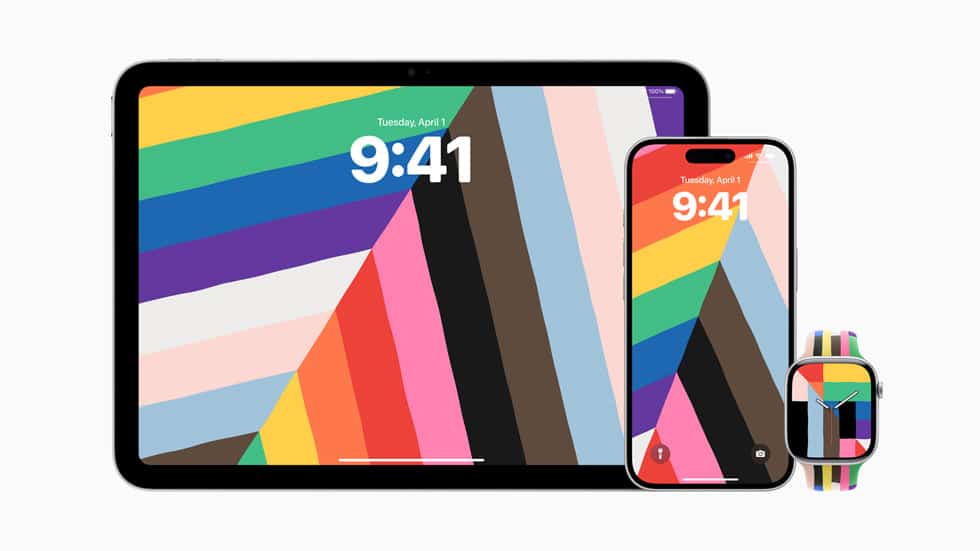

Released on May 12, 2025, the watchOS 11.5 update brings two standout features alongside important stability and security fixes. First, the new Pride Harmony watch face lets you display an animated abstract Pride flag on your wrist, complete with dynamic rainbow stripes forming bold hour numerals. Second, the “Buy with Apple Watch” integration for the Apple TV app lets you confirm and complete content purchases directly from your watch, no remote or phone required.
Pride Harmony Watch Face
Pride Harmony offers a spirited, colorful interpretation of the Pride flag that animates whenever you raise your wrist. On Apple Watch Series 10, the upgraded always-on display even shows the seconds hand while dimmed, making the face both festive and informative.
Buy with Apple Watch
When you browse movies, shows or subscriptions on a smart TV or streaming device, a prompt appears on your Apple Watch. Simply double-press the side button to approve and finalize the purchase instantly, streamlining your entertainment workflow.
Bug Fixes and Security Updates
This update resolves an issue that prevented your iPhone from notifying you when your Apple Watch reached full charge, restoring the “Apple Watch Is Fully Charged” alert. It also includes under-the-hood security patches to improve overall system stability—see the watchOS 11.5 Release Notes for full details.
Related Read
For a look back at Apple’s last major watchOS tweak, check out watchOS 11.4 unleashes breakthrough silent mode, smart home surprises.
Ready to Upgrade? Here’s How
On Your Apple Watch:
- Open the Settings app.
- Tap General > Software Update.
- When watchOS 11.5 appears, tap Install and follow the prompts.
Via Your iPhone:
- Ensure your Apple Watch is charged to at least 50% and connected to Wi-Fi.
- Open the Apple Watch app.
- Go to General > Software Update, then download and install watchOS 11.5 by following the on-screen instructions.
Compatible with Apple Watch Series 6 and later, all Apple Watch Ultra models, and Apple Watch SE 2.
Related posts
watchOS 11.4 Unleashes Breakthrough Silent Mode & Smart Home Surprises
The public release of watchOS 11.4 from Apple has received substantial attention from Apple Watch enthusiasts.
Read more watchOS 11.4 Unleashes Breakthrough Silent Mode & Smart Home Surprises
Apple’s Latest watchOS 11.4 Beta Release: Fresh Developer Tools & Smoother Experiences
Apple has just rolled out watchOS 11.4 Beta 1, packed with innovative updates for developers and significant performance enhancements for users.
Read more Apple’s Latest watchOS 11.4 Beta Release: Fresh Developer Tools & Smoother Experiences
Apple Releases watchOS 11.3.1: Bug Fix Update
Apple has released watchOS 11.3.1, a streamlined update focused on fixing bugs and improving performance on the Apple Watch.
Read more Apple Releases watchOS 11.3.1: Bug Fix UpdatePopular Watch Faces



Brands