How to Unpair an Apple Watch Without an iPhone

If you lost access to the iPhone paired with your Apple Watch, you are not completely stuck. You can still erase the watch, remove Activation Lock through Find My, or get it ready to pair again from another device depending on what access you still have.
The key difference is this: erasing the watch is not always the same as fully unpairing it. A reset wipes the data on the watch, but it may leave Activation Lock attached to your Apple Account. This guide walks through the safe options in the right order.
Why Unpairing Usually Requires an iPhone
When you unpair an Apple Watch from the Watch app on its paired iPhone, Apple handles several jobs at once. The watch is erased, a fresh backup is created, and Activation Lock is removed so the device can be paired again or handed to someone else without extra cleanup.
If you no longer have that paired iPhone, only part of the process can happen locally on the watch. You can still erase it, but you may need a second step in Find My before the watch is fully removed from your account.
Option 1: Erase Directly From the Apple Watch
If the watch is in your hands and you know its passcode, the fastest path is to reset it from the watch itself.
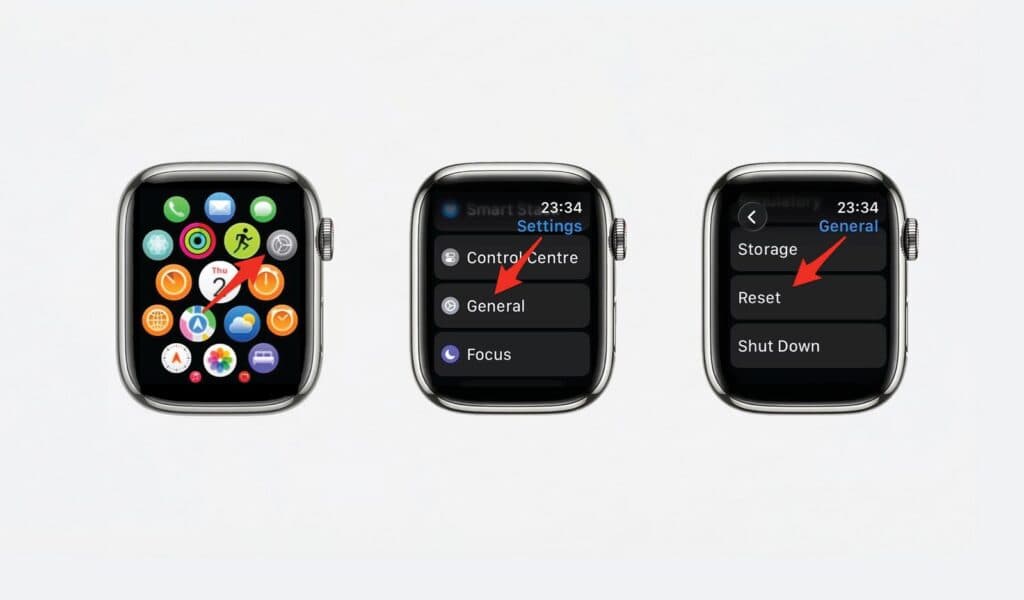
- On your Apple Watch, open Settings.
- Tap General.
- Scroll down and tap Reset.
- Choose Erase All Content and Settings.
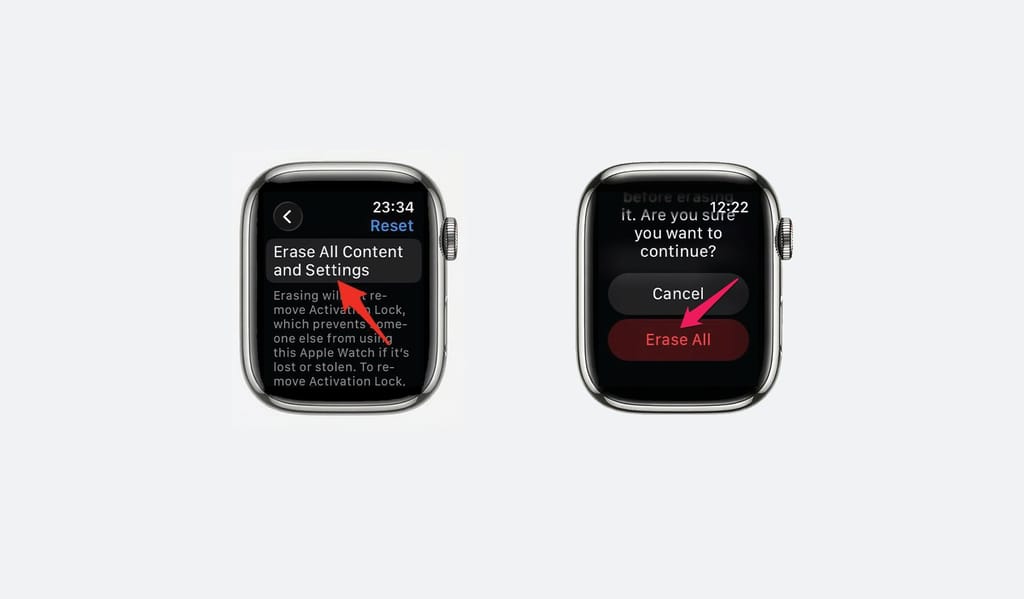
- Enter your passcode if prompted.
- Tap Erase All to confirm and let the watch reset.
If you have a GPS + Cellular model, the watch may also ask what to do with the cellular plan. Keep it if you plan to pair the watch again soon. Remove it if you are parting with the device and do not want the plan tied to it.
This method wipes your data, but it does not always remove Activation Lock. If the watch is still tied to your Apple Account, you will be asked for that account and password when the watch is set up again.
Option 2: Use Find My to Remove Activation Lock
If you cannot use the paired iPhone but you still have access to your Apple Account, use Find My on iCloud or another Apple device signed in to the same account. This is the cleanest remote way to remove the watch from your account.
- Go to iCloud.com/find and sign in with your Apple Account.
- Open Find My.
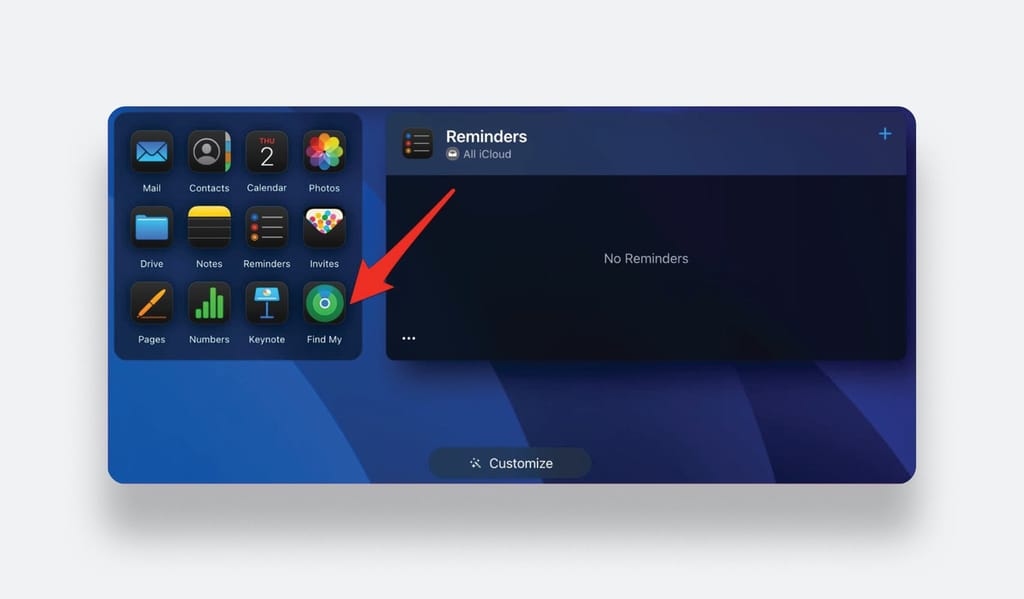
- Select your Apple Watch from the device list.
- Choose Erase and follow the prompts until the watch is wiped.
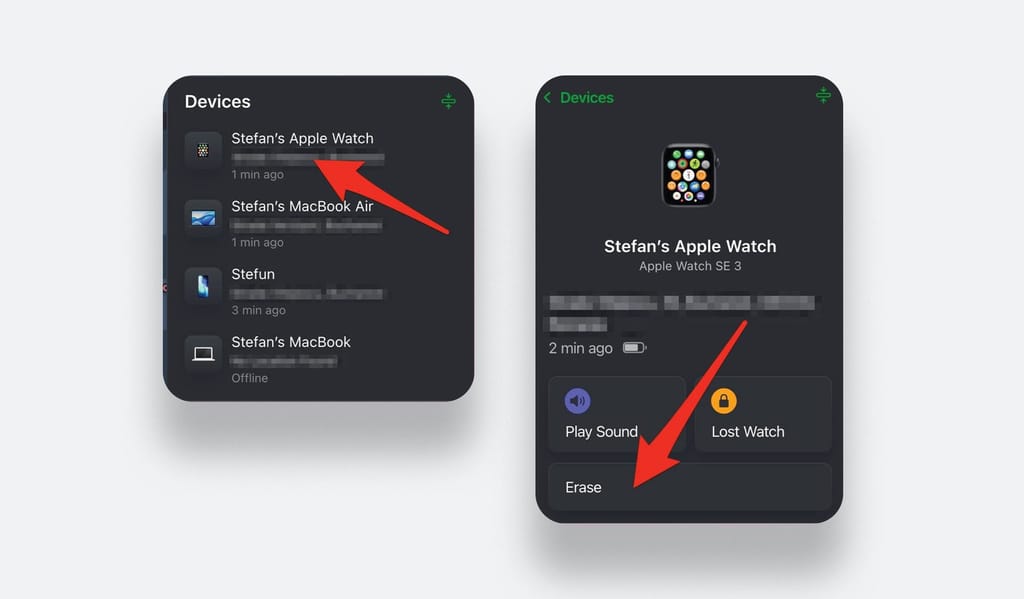
- After the erase finishes, choose Remove from Account so Activation Lock is cleared.
This option is especially helpful if the paired iPhone was lost, broken, or stolen. The watch still needs to connect to the internet at some point for the remote actions to complete.
What Another iPhone Can and Cannot Do
A borrowed iPhone can help you pair the watch again after it has already been erased, but it does not replace the original paired iPhone for Apple’s full backup-first unpair flow. If you need a fresh local backup before erasing, you need the iPhone that the watch was paired with.
- Erase the watch first from the watch itself or remove it through Find My.
- Install the Watch app on the iPhone you are borrowing if it is not already there.
- Bring the iPhone close to the erased watch and start the pairing process.
- Sign in with the Apple Account that was previously attached to the watch if Activation Lock appears.
- If your goal is to save the current watch state before erasing, wait until you regain access to the original paired iPhone.
Option 3: Contact Apple Support
If none of the options above work, or if the watch is secondhand and still locked to someone else’s Apple Account, Apple Support is the right next step.
- Gather proof of purchase, such as a receipt, order confirmation, or device serial number tied to your order.
- Go to support.apple.com or visit an Apple Store.
- Explain that you need help removing Activation Lock from an Apple Watch you own.
- Provide any ownership documents Apple requests.
- Wait for Apple to review the case and confirm whether the lock can be removed.
Apple does not remove Activation Lock casually, which is exactly why the feature is useful against theft. If you bought the watch secondhand and cannot reach the previous owner, proof of purchase matters.
Final Thoughts
You can still reset an Apple Watch without the paired iPhone, and in many cases that is enough to get moving again. The quickest local option is to erase the watch from Settings. If you also need to remove Activation Lock, Find My is usually the missing step.
The situation becomes more complicated only when you do not have the Apple Account credentials linked to the watch. In that case, skip workarounds and go straight to Apple Support with proof of purchase.
Frequently Asked Questions
Yes. You can erase the watch directly from its Settings menu. If Activation Lock stays attached to your Apple ID, you will still need those credentials during setup.
Yes. A direct reset wipes the local data stored on the watch. Without a recent backup from a paired iPhone, that information cannot be restored.
It can. Erasing the watch from its own Settings menu removes your data, but it may not remove the Apple ID connection that protects the device from being set up by someone else.
No. Apple Watch pairing and standard unpairing still depend on an iPhone and the Watch app.
Sign in to Find My on iCloud, select your Apple Watch, erase it, and then choose Remove from Account to clear Activation Lock.
Contact Apple Support and be ready to provide proof of purchase. Apple can review the case and remove the lock only after ownership is verified.